# Flashcard Best Practices: How to Take Notes and Create Flashcards Easily
> Flashcard best practices explained. Create effective cards using AI, spaced repetition, and active recall to memorize vocabulary faster.
**URL:** https://migaku.com/blog/language-fun/flashcard-best-practices-language-learning
**Last Updated:** 2026-03-06
**Tags:** vocabulary, resources, discussion, deepdive
---
You've probably heard flashcards work great for [language learning](https://migaku.com/), but here's the thing: most people make them wrong. I've seen learners waste hours creating cards that barely help them remember anything. The difference between effective flashcards and useless ones comes down to a few key principles. This guide will show you exactly how to make flashcards that stick in your memory and help you use the language you're learning.
---
## Why flashcards work for language learning
Flashcards tap into something called active recall, which is basically your brain working to retrieve information instead of passively reading it. When you flip a flashcard and force yourself to remember the answer, you're strengthening that neural pathway way more than just reading a word list in your textbook.
The science here is pretty solid. [Studies](https://psycnet.apa.org/record/2011-04504-004) show that active recall creates stronger memories than passive review. Your brain has to work harder, and that effort translates into better retention. Every time you successfully recall a word or phrase, you're telling your brain "this information matters, keep it accessible."
There's also the Picture Superiority Effect, which explains why adding images to your flashcards makes them way more effective. Your brain processes and remembers visual information better than text alone. When you pair a new vocabulary word with a relevant image, you're creating multiple memory hooks instead of just one.
[Spaced repetition](https://migaku.com/blog/language-fun/spaced-repetition-vs-cramming) takes this further by showing you cards right when you're about to forget them. This timing maximizes memory consolidation without wasting your time reviewing stuff you already know cold. Apps use algorithms to calculate these intervals, but even paper flashcards work if you manually sort them by difficulty.
---
## How to create effective flashcards from scratch
Making good flashcards takes some thought. You can't just copy every word from your textbook and expect magic results.
1. **Start with one concept per card.** This seems obvious, but I've seen people cram entire grammar explanations onto single cards. Keep it simple. One word, one phrase, one grammar point. If you're learning Spanish and want to remember "biblioteca" means library, that's your card. Don't add "librería" (bookstore) on the same card just because it looks similar.
2. **Use your target language on the front, your native language on the back.** Some people do this backwards, but you'll mostly need to understand the language when you hear or read it. Recognition comes before production in [natural language acquisition](https://migaku.com/blog/language-fun/comprehensible-input-method-language-learning).
3. **Add context to every card.** Instead of just "run" and "correr", make your card "I run every morning" and "Corro cada mañana". Phrases beat isolated words because they show you how the word actually gets used. You'll remember the grammar patterns naturally this way.
4. **Images beat translations when possible.** If you're learning the word for "apple", put a picture of an apple on the back instead of the English word. Your brain will associate the foreign word directly with the concept, not with the English translation as a middleman.
5. **Personal examples work better than generic ones.** If you're learning "embarrassed", use a sentence about something that actually embarrassed you. The emotional connection makes it stick. I still remember certain Japanese vocabulary words years later because I connected them to real experiences.
---
## Advanced techniques to memorize words faster
1. **Mnemonics** can save you on tough words. If you're learning German and can't remember that "Eichhörnchen" means squirrel, use flashcards to create a weird mental image connecting the sounds to the meaning. The weirder and more personal, the better it sticks.
2. **Audio** on your cards helps with pronunciation and listening comprehension. Record yourself saying the word or find native speaker audio online. When you review the card, listen before you flip it. This connects the written form with the sound.
3. **Reverse cards test production**, not just recognition. After you've learned "biblioteca" means library, add a reverse card that shows "library" and makes you recall "biblioteca". This forces you to actively produce the language, which is harder but more useful for speaking.
4. **Cloze deletions** work great for grammar patterns. Instead of "subjunctive conjugation of hablar", make a card that says "Es importante que yo (blank) español" and you have to fill in "hable". You're learning the pattern in context, which is how you'll actually use it.
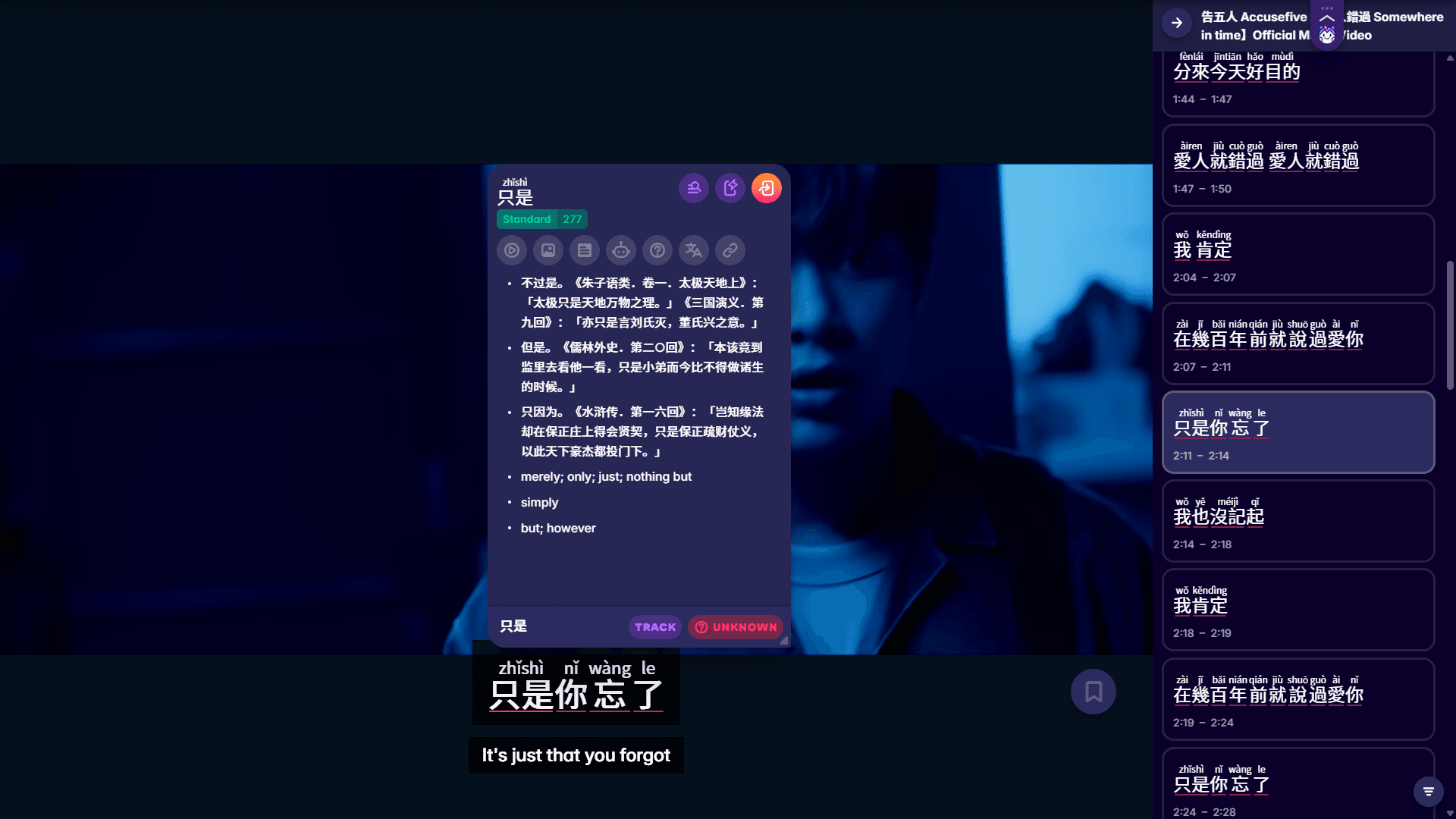
5. **[Sentence mining](https://migaku.com/blog/language-fun/sentence-mining-guide-learn-vocabulary-faster)** from content you enjoy beats any pre-made deck. When you watch a show and hear a cool phrase, make that exact sentence into a flashcard. You'll remember it better because it came from something you cared about, and you'll have the context of the scene in your memory.
---
## Digital vs paper flash cards
Both work, but they have different strengths.
- Paper flashcards give you physical interaction with the material. Writing them out by hand helps some people remember better. You can spread them on a table, sort them into piles, and there's zero screen time involved. The downside? They're bulky, you can lose them, and you have to manually manage the spaced repetition yourself.
- Digital flashcards solve the organization problem. Apps track which cards you struggle with, automatically schedule reviews, and let you study anywhere on your phone. You can add audio recordings, images, and even AI-generated content. Most apps sync across devices, so your progress follows you.
The real advantage of digital is **the spaced repetition system**. These algorithms calculate exactly when to show you each card based on how well you remembered it last time. Anki is the most popular app for this, though the interface looks like it was designed in 2003. Other options include Quizlet, which has a cleaner design but less sophisticated scheduling.
> Here's my take: **use digital for the long haul**. Paper works fine for short-term cramming or if you really hate screens, but digital apps will save you hundreds of hours over months of studying.
---
## Using AI to make new cards faster
AI has changed the flashcard game completely in the last couple years. You can generate decent cards in seconds instead of spending 20 minutes crafting each one.
✅ChatGPT and similar AI tools can **create flashcard decks from any text you give them**. Copy a news article in your target language, paste it into ChatGPT, and ask it to make flashcards for the 20 most useful vocabulary words. You'll get a deck with example sentences in under a minute.
✅AI can also **generate images for your cards**. Instead of searching Google Images for "perro" and hoping you find a good picture of a dog, just ask an AI image generator to create one. Some flashcard tools like Revisely now have this built in.
❌The quality isn't perfect though. AI sometimes creates weird example sentences or misses important nuances. Always review what the AI generates before you start studying. I've caught AI tools giving me technically correct but totally unnatural phrases that no native speaker would say.
Some apps now use AI to quiz you in different formats automatically. Instead of just showing you the same card format every time, the AI might ask you to fill in a blank, choose from multiple options, or even generate a conversation using the word. This variety helps cement the knowledge from different angles.
---
## Keep the flashcard deck concise for your study
Don't try to memorize every word you encounter. You'll burn out fast and waste time on stuff you'll never use.
1. **Focus on high-frequency words first.** The top 1,000 words in any language cover about 80% of everyday conversation. Learn those before you worry about specialized vocabulary. You can find frequency lists online for basically any language.
2. **Add words from your actual immersion.** When you're watching a show or reading and you encounter a word multiple times, that's your signal to make a card. If you only saw it once in some random article, skip it. The repetition in your input tells you what's common.
3. **Create themed decks for specific situations.** A "restaurant vocabulary" deck makes way more sense than random words thrown together. Your brain likes categorical organization. When you study related concepts together, they reinforce each other.
4. **Keep your daily reviews manageable.** Starting with 10 new cards per day is plenty. Some people go crazy and try to learn 50 new words daily, then quit after a week because it's overwhelming. Consistency beats intensity every time.
---
## Common mistakes when creating flashcards
1. Putting too much information on one card is the biggest mistake I see. Your brain can't process a paragraph of explanation in the three seconds you look at a flashcard. Break complex ideas into multiple simple cards.
2. Making cards for words you don't need wastes your time. Just because a word exists in your textbook doesn't mean you need to memorize it right now. Prioritize based on your goals and what you encounter in real content.
3. Reviewing without trying to recall kills the whole point. Some people flip the card after half a second and think they're studying. Nope. You need to attempt to remember before you check the answer. That struggle is where the learning happens.
4. Never updating or deleting cards leads to a bloated deck full of stuff you either already know perfectly or will never use. Go through your deck every few months and delete cards that you can remember the information already. Your time is valuable.
5. Skipping the hard cards and only reviewing easy ones feels good but teaches you nothing. The cards you struggle with are exactly the ones you need to see more. Most apps will automatically show you difficult cards more frequently if you rate them honestly.
---
## Making flashcards from your textbook and other sources
1. You can definitely make your flashcards from your **class textbook**. Just don't copy the example sentences word-for-word if they're boring. Take the vocabulary or grammar point and create your own example that's more memorable or relevant to your life. Most textbooks have way too much vocabulary per chapter. Pick the 10-15 words that seem most useful or that you keep forgetting. You don't need to memorize every single word in the glossary.
2. **News articles, podcast transcripts, and social media posts** make great flashcard sources. The language is current and natural. When you find a post in your target language that uses a word or phrase in an interesting way, screenshot it and turn it into a card.
3. **Song lyrics** work surprisingly well for flashcard making too. You'll remember vocabulary that appears in songs you like because the melody creates an extra memory hook. Just make sure you understand the grammar and that the lyrics aren't too poetic or weird.
4. **Conversation partners** are goldmine sources. When a native speaker corrects you or teaches you a new phrase, immediately make a flashcard. You'll remember it better because it came from a real interaction where you needed that exact piece of language.
Anyway, if you want to combine flashcards with actual immersion content, Migaku's browser extension lets you create cards instantly from words you look up while watching shows or reading articles. The AI features help generate example sentences and find images automatically. There's a 10-day free trial if you want to check it out.
 ---
## FAQs
The science supports flashcards for vocabulary retention. Active recall and spaced repetition are legit backed by research. But here's the reality: flashcards alone won't make you fluent. You also need listening practice, reading, speaking, and actual usage.
Daily is ideal, even if it's just 10 minutes. Spaced repetition works because of the timing, and skipping days messes up the algorithm. Your app will show you more cards tomorrow if you skip today, creating a backlog that feels overwhelming. Most people can handle 15-20 minutes of flashcard review per day long-term. More than that and you'll probably burn out unless you're really motivated. Less than that and you might not see progress fast enough to stay motivated.
---
## Use flashcards and adapt the strategy to your preference
Yeah, flashcards work, but they're just one tool. Some people swear by them and build entire learning systems around spaced repetition. Others find them boring and prefer [immersion-only approaches](https://migaku.com/blog/language-fun/best-language-learning-methods). The key is to find a way to combine different learning tools. Immersion learning and flashcards using are not mutually exclusive. On the contrary, with a browser extension tool like Migaku, taking notes and generating lots of cards from media content becomes streamlined and simple.
> If you consume media in the language you want to learn, and you understand at least some of the messages and sentences within that media, you will make progress. _Period_.
Review often, remember longer.🧠
---
## FAQs
The science supports flashcards for vocabulary retention. Active recall and spaced repetition are legit backed by research. But here's the reality: flashcards alone won't make you fluent. You also need listening practice, reading, speaking, and actual usage.
Daily is ideal, even if it's just 10 minutes. Spaced repetition works because of the timing, and skipping days messes up the algorithm. Your app will show you more cards tomorrow if you skip today, creating a backlog that feels overwhelming. Most people can handle 15-20 minutes of flashcard review per day long-term. More than that and you'll probably burn out unless you're really motivated. Less than that and you might not see progress fast enough to stay motivated.
---
## Use flashcards and adapt the strategy to your preference
Yeah, flashcards work, but they're just one tool. Some people swear by them and build entire learning systems around spaced repetition. Others find them boring and prefer [immersion-only approaches](https://migaku.com/blog/language-fun/best-language-learning-methods). The key is to find a way to combine different learning tools. Immersion learning and flashcards using are not mutually exclusive. On the contrary, with a browser extension tool like Migaku, taking notes and generating lots of cards from media content becomes streamlined and simple.
> If you consume media in the language you want to learn, and you understand at least some of the messages and sentences within that media, you will make progress. _Period_.
Review often, remember longer.🧠